
Download TeacherPlus Gradebook – Chrome Apps, Teacher Gradebook, Google Chrome App
Overview
TeacherPlus Gradebook is a desktop-gradebook application designed specifically for educators within Administrator's Plus schools. Built as a Google Chrome App, it offers streamlined access to essential classroom management tools, including grading, attendance tracking, skill assessment, and comment entry. The software aims to simplify daily administrative tasks for teachers, enabling them to manage student performance efficiently from any device that supports Chrome OS, Windows, or Mac.
Target users include K–12 teachers, school administrators, and instructional staff who rely on structured digital gradebooks for academic reporting. The application integrates directly with existing TeacherPlus accounts, ensuring continuity with school-specific data systems. It is particularly suited for institutions using the Administrator's Plus ecosystem, where centralized management and consistent data standards are prioritized.
Real-world usage scenarios include grading assignments during planning periods, recording daily attendance, documenting student progress on learning objectives, and providing feedback through structured comments. The app supports a paperless workflow, reducing the time spent on manual data entry and report preparation. While the developer did not provide additional system requirements, the software is available as a lightweight Chrome App with a 15.5 MB installation size.
Key Features & Capabilities
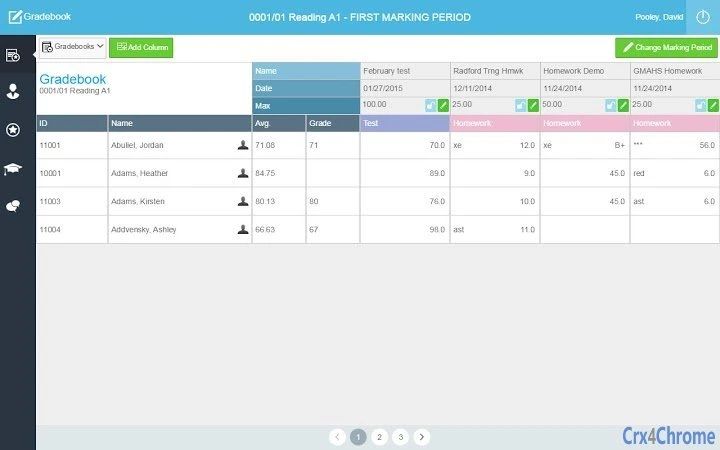
- Gradebook Access – Teachers can view and update student grades in real time, with support for multiple grading scales and assignment categories.
- Attendance Tracking – Built-in tools allow educators to record daily attendance, mark absences, tardiness, and excused absences with a few clicks.
- Skills-Based Assessment – The software supports skill mapping, enabling teachers to assess students against specific learning standards or competencies.
- Comment Management – Users can add, edit, and organize comments for individual students, supporting detailed feedback and report card preparation.
- Secure Login Integration – Access is protected through existing TeacherPlus account credentials, ensuring data privacy and role-based access control.
These features are designed to support a seamless classroom workflow. For example, a teacher can log in during a break, update grades for a completed quiz, mark attendance, and leave a comment on a student’s progress—all within a single session. The app’s integration with the TeacherPlus ecosystem ensures that all changes are synchronized across the school’s administrative platform, minimizing data duplication and errors.
User Interface, Workflow & Performance
The user interface of TeacherPlus Gradebook is structured around a clean, task-oriented layout optimized for the Chrome App environment. Navigation is intuitive, with a sidebar menu providing quick access to grading, attendance, skills, and comments sections. The design prioritizes readability, using clear labels, consistent icons, and logical grouping of related functions.
Workflow efficiency is enhanced by context-sensitive actions—such as one-click grade entry and auto-save features—reducing the number of steps required to complete common tasks. The app’s responsiveness is consistent with typical Chrome App behavior, offering minimal lag during navigation and data input. However, exact performance details were not specified by the developer.
Stability appears to be well-maintained, as the software is regularly updated, with version 2.0.1 released in July 2023. Resource usage patterns are not publicly documented, but the 15.5 MB file size suggests a lightweight footprint. The developer did not specify CPU or RAM behavior, so users should monitor performance based on their device’s capabilities.
Compatibility & System Requirements
TeacherPlus Gradebook is compatible with Chrome OS, Windows, and Mac operating systems. It is distributed as a Google Chrome App, meaning it runs within the Chrome browser environment across supported platforms. The software has a file size of 15.5 MB, indicating a compact installation footprint.
While the developer did not provide detailed hardware requirements, the application’s lightweight nature suggests it will function on most modern devices. Compatibility information was partially provided, with no mention of older OS versions or specific processor or memory thresholds. Users should ensure their system supports Google Chrome and has an active internet connection for login and synchronization.
Pros and Cons
Pros
- Specifically designed for schools using Administrator's Plus systems
- Lightweight installation at 15.5 MB
- Direct integration with TeacherPlus accounts for secure access
- Supports multiple classroom management functions in one app
- Available on Chrome OS, Windows, and Mac
Cons
- Requires a TeacherPlus account and school license key for access
- Dependent on Google Chrome for operation
- Limited to users within Administrator's Plus schools
- Exact system requirements not publicly listed
- Performance under heavy usage not documented
FAQ Section
Is TeacherPlus Gradebook compatible with all Chromebooks?
Yes, the software is designed as a Google Chrome App and will run on any device that supports Chrome OS and has an active internet connection.
Can I use TeacherPlus Gradebook offline?
While the app requires an internet connection for login and data synchronization, limited functionality may be available in offline mode depending on the current Chrome App behavior.
Is the software secure?
Access is protected through existing TeacherPlus account credentials. The developer did not provide additional security details, but login is managed through a secure authentication system.
How often is the software updated?
Version 2.0.1 was released in July 2023, indicating regular updates. The frequency of future updates is not specified.
What license type does TeacherPlus Gradebook use?
The software is free to use, but access requires a valid school license key obtained from a gradebook manager or supervisor.
Final Thoughts + CTA
TeacherPlus Gradebook delivers a focused, efficient solution for educators within Administrator's Plus schools. Its integration with existing TeacherPlus accounts, combined with a clean interface and essential classroom tools, makes it a valuable addition to any teacher’s digital toolkit. While it is limited to a specific school ecosystem, its lightweight design and cross-platform availability enhance accessibility across devices.
For teachers seeking a reliable, no-cost gradebook tool that supports grading, attendance, skills tracking, and feedback, this app provides a practical and secure workflow. It is especially beneficial for institutions already invested in the Administrator's Plus platform.
Download TeacherPlus Gradebook now







